
Income Tax Refund Not Received (2026): Reasons, Status Check & Step-by-Step Fix

If your income tax refund has not been received, the delay is almost always caused by one of five issues: pending e-verification, an unvalidated bank account, an AIS/Form 26AS data mismatch, an adjustment against a previous tax demand, or enhanced AI compliance scrutiny by the Centralized Processing Centre (CPC).
While standard e-verified returns typically process within 2 to 5 weeks, returns flagged for data verification or high-value claims can take longer. Follow this complete troubleshooting guide to check your exact refund stage, fix failed credits, claim delayed refund interest, and escalate stuck filings.
Quick Diagnostic: What Does Your ITR Refund Status Mean?
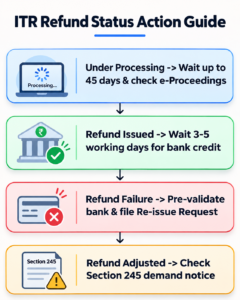
Before taking action, check your exact status on the e-Filing portal. Use the table below to match your portal status to the right fix:
| Portal Status Message | What It Actually Means | What You Should Do Now |
| Return Submitted & Pending e-Verification | Your ITR is not valid yet. CPC will not start processing until you verify it. | Complete e-verification immediately (within 30 days of filing to avoid late filing penalties). |
| Successfully e-Verified / Under Processing | CPC is cross-checking your ITR against AIS, Form 26AS, and TDS records. | Wait if it has been under 45 days and no notice appears under e-Proceedings. |
| Processed with Refund Due | Your refund is approved and queued for dispatch via SBI (the refund banker). | Wait 3 to 5 working days for NEFT/RTGS credit to hit your bank account. |
| Refund Issued / Paid | The payment instruction has been sent to your bank, or already credited. | Check your bank statement (search for CBDT or ITD REFUND). If missing after 5 days, check with your bank. |
| Refund Failure / Returned | Your bank rejected the transfer (closed account, wrong IFSC, or inactive validation). | Re-validate an active bank account and submit a Refund Re-issue Request. |
| Refund Adjusted Against Demand | Your refund was used to pay off an old tax demand under Section 245. | Check Pending Actions > Response to Outstanding Demand and verify if the old demand is valid. |
| Defective Return (Section 139(9)) | Missing schedules or incomplete tax details halted processing. | File a corrected return within 15 days of receiving the notice. |
How to Check Your Income Tax Refund Status Online
You can track your refund in two ways—with or without logging into your account.
Method 1: Through the Income Tax e-Filing Portal (Detailed View)
- Visit the official Income Tax e-Filing Portal.
- Log in using your PAN (User ID) and password.
- Navigate to e-File > Income Tax Returns > View Filed Returns.
- Locate the relevant Assessment Year (e.g., AY 2026-27 or AY 2025-26) and click View Details.
- Expand the timeline to view the exact date of processing, refund amount approved, bank account number, and any failure or adjustment remarks.
Method 2: Without Logging In (Quick Status Check)
- Go to the Income Tax e-Filing Portal homepage and click Know Your Refund Status under Quick Links.
- Enter your PAN, select the Assessment Year, and provide your mobile number.
- Enter the 6-digit OTP to view your current refund dispatch status.
7 Common Reasons Why Your ITR Refund Is Delayed (And How to Fix Each)
- Enhanced AI Scrutiny and AIS / Form 26AS Mismatches
The Income Tax Department uses automated risk-management algorithms to match every rupee in your ITR against your Annual Information Statement (AIS), Taxpayer Information Summary (TIS), and Form 26AS. Even small discrepancies—such as unreported savings bank interest, dividend income, or mismatched HRA/80C deductions—push your return out of fast-track processing.
- The Fix: Download your AIS and Form 26AS from the portal and compare them line-by-line with your filed ITR. If you missed reporting income, file a Revised Return under Section 139(5) before the statutory deadline.
- Bank Account Not Pre-Validated (or Validation Failed)
The CPC credits refunds only to a bank account that is pre-validated and EVC-enabled on the e-Filing portal. Common triggers for silent failure include:
- Your bank merged with another bank and your IFSC code changed.
- Your name on the bank account does not match your PAN database name (e.g., initials vs. full middle name).
- Your account became dormant or KYC-restricted.
- The Fix: Go to Profile > My Bank Accounts. Check if your chosen account shows “Validated” with the “Nominate for Refund” toggle switched ON. If validation failed, update your KYC/name at your bank or add another active account and nominate it for refund.
- Pending e-Verification Beyond the 30-Day Window
Filing an ITR is only half the process. If you do not e-verify within 30 days of submission, your return is treated as invalid—or as filed on the late verification date, triggering late fees under Section 234F and delaying refunds.
- The Fix: Go to e-File > Income Tax Returns > e-Verify Return and verify immediately via Aadhaar OTP, Net Banking, or Demat EVC.
- Adjustment Against an Outstanding Tax Demand (Section 245)
If you had unpaid taxes from an earlier assessment year, the CPC can legally set off your current refund against that old demand under Section 245.
- The Fix: Go to Pending Actions > Response to Outstanding Demand.
- If the old demand is legitimate, no further action is needed—any remaining balance after adjustment will be refunded.
- If the demand is wrong or already paid, select “Disagree with Demand”, choose the reason, and upload challan receipts or rectification proof.
- PAN–Aadhaar Link Status Is Inoperative
If your PAN is not linked with Aadhaar, your PAN becomes inoperative. The system automatically blocks refund issuance and stops Section 244A interest accumulation until the link is restored.
- The Fix: Use the Link Aadhaar option on the e-Filing homepage, pay the applicable fee if required, and wait for PAN reactivation before raising a refund reissue request.
- Pending Response to a Notice Under e-Proceedings
Sometimes your refund is held because CPC sent an intimation under Section 143(1)(a) (proposed adjustment) or a defective return notice under Section 139(9).
- The Fix: Check Pending Actions > e-Proceedings (and check your email spam folder for messages from donotreply@incometax.gov.in). Submit your response before the due date to unlock processing.
- High-Value Refunds or Capital Gains Claims
Returns claiming large refunds, complex capital gains exemptions (Sections 54/54F), or foreign tax credits undergo secondary manual verification, extending timelines beyond the usual 30–45 days.
How to Submit a Refund Re-issue Request (If Refund Failed)
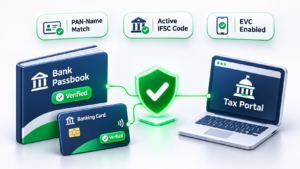
If your status says Refund Failure or Refund Returned, the money will not be resent automatically. Follow these steps:
- Log in to the Income Tax e-Filing Portal.
- Ensure at least one active bank account under Profile > My Bank Accounts shows Validated and has Nominate for Refund enabled.
- Click Services > Refund Re-issue.
- Click Create Refund Re-issue Request and select the Assessment Year.
- Select your validated bank account and click Proceed to Verification.
- Authenticate using Aadhaar OTP, EVC, or DSC.
- Track the reissue status under Services > Refund Re-issue > View Refund Re-issue Requests. Reissued refunds typically credit within 10 to 21 working days.
Revised Return vs. Section 154 Rectification: Which One Do You Need?
If your ITR was processed with less refund than expected (or zero refund), choose the right corrective action:
- File a Rectification Request (Section 154): Use this when you reported everything accurately, but the CPC made an apparent calculation or TDS credit error (for example, ignoring TDS visible in your Form 26AS or miscalculating tax slabs). Go to Services > Rectification.
- File a Revised Return (Section 139(5)): Use this when you made a mistake in your original ITR—such as forgetting to claim a deduction, entering wrong bank interest, or selecting the wrong tax regime.
Will You Get Interest on a Delayed Income Tax Refund?
Yes. Under Section 244A of the Income-tax Act, 1961 (and corresponding Section 437 of the Income-tax Act, 2025), the Income Tax Department pays simple interest at 0.5% per month (6% per annum) on delayed refunds:
- If you filed on or before the due date: Interest is calculated from 1 April of the Assessment Year until the date the refund is granted.
- If you filed a belated return: Interest is calculated from the date of filing until the date the refund is granted.
- Important Exceptions:
- No interest is payable if the refund amount is less than 10% of the total tax determined.
- You do not earn interest for periods where the delay was caused by you (e.g., late e-verification, unvalidated bank account, or delayed response to a notice).
Step-by-Step Escalation Ladder If Your Refund Is Stuck
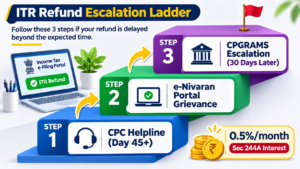
If more than 45 to 60 days have passed since e-verification with no notices or updates, escalate in this exact order:
- Step 1 — Call the CPC Helpline: Call 1800 103 0025 or 1800 419 0025 (or +91-80-46122000) with your 15-digit ITR Acknowledgement Number.
- Step 2 — Raise an e-Nivaran Grievance: Log in to the e-Filing portal, go to Grievances > Submit Grievance, select CPC-ITR as the department, choose Refund as the category, and attach a PDF screenshot of your status and pre-validated bank account.
- Step 3 — Escalate on CPGRAMS: If your e-Nivaran grievance remains unresolved after 30 days, file a formal public grievance on the Government of India’s CPGRAMS portal under Ministry of Finance > Department of Revenue (CBDT).
Not an Income Tax Refund? What to Do If a Merchant, UPI, or Card Refund Is Missing
If you are waiting on a refund from an e-commerce store, payment gateway, UPI app, or bank, follow these rules:
- Standard Settlement Windows:
- UPI / Wallet: Instant to 24 hours (up to 3 working days in bank-hold cases).
- Debit / Credit Card & Net Banking: 5 to 7 working days.
- What to Ask the Merchant: Request the RRN (Retrieval Reference Number) for UPI/IMPS or ARN (Acquirer Reference Number) for card refunds. Without an RRN/ARN, the refund has not left the merchant’s payment gateway.
- Your RBI Protection: Under Reserve Bank of India (RBI) Turnaround Time (TAT) guidelines, if a failed UPI or card transaction is not reversed within T+1 to T+5 days (depending on the payment rail), the bank is liable to pay ₹100 per day in automatic compensation until the credit is completed.
Frequently Asked Questions (FAQs)
- My ITR status says “Refund Issued,” but my bank account has no credit. Why?
Once CPC marks a refund as “Issued,” SBI takes 3 to 5 working days to process the NEFT/RTGS batch. Check your bank statement for entries labeled CBDT or ITD. If 7 working days pass with no credit, verify whether the refund bounced back due to an IFSC change or name mismatch, and check Services > Refund Re-issue.
- What is the maximum deadline for the Income Tax Department to process my return?
By law, the CPC has 9 months from the end of the financial year in which the return was filed to send the Section 143(1) intimation. For returns filed during FY 2025-26, the outer statutory deadline is 31 December 2026; for returns filed during FY 2026-27, the outer deadline is 31 December 2027.
- Does a delayed refund mean my ITR has been picked for full tax scrutiny?
No. Most delays are caused by automated AIS/26AS cross-checks or peak-season processing queues. Full scrutiny under Section 143(3) only happens if you receive a formal scrutiny notice under your e-Proceedings tab.
- Can I change my bank account after filing my ITR if my refund failed?
Yes. Add and pre-validate your new active bank account under Profile > My Bank Accounts, switch on Nominate for Refund, and then select that new account when raising a Refund Re-issue Request.